Schedules
Holiday hours without rebuilding the calendar
Set a standard week, then drop school holidays and peak weekends on top. Close a date and nothing sells on it.
Booking, till and waiver software for attractions
Bookings, a complete register, waivers and memberships in one system.
Live demo · escape rooms
An interactive example of the checkout your guests would use. Pick a venue, a time and a party size, then press pay. Nothing is charged.
Pick your kind of venue and see Reservory set up for it.
 Escape roomsOne group per room, a reset after every game, and a waiver for everyone before the clock starts.
 Axe throwingLanes, group bookings and safety waivers, with the bar and the register on the same system.
 Mini golfTimed tee-offs that keep the course moving, plus the café and gift cards on the same system.
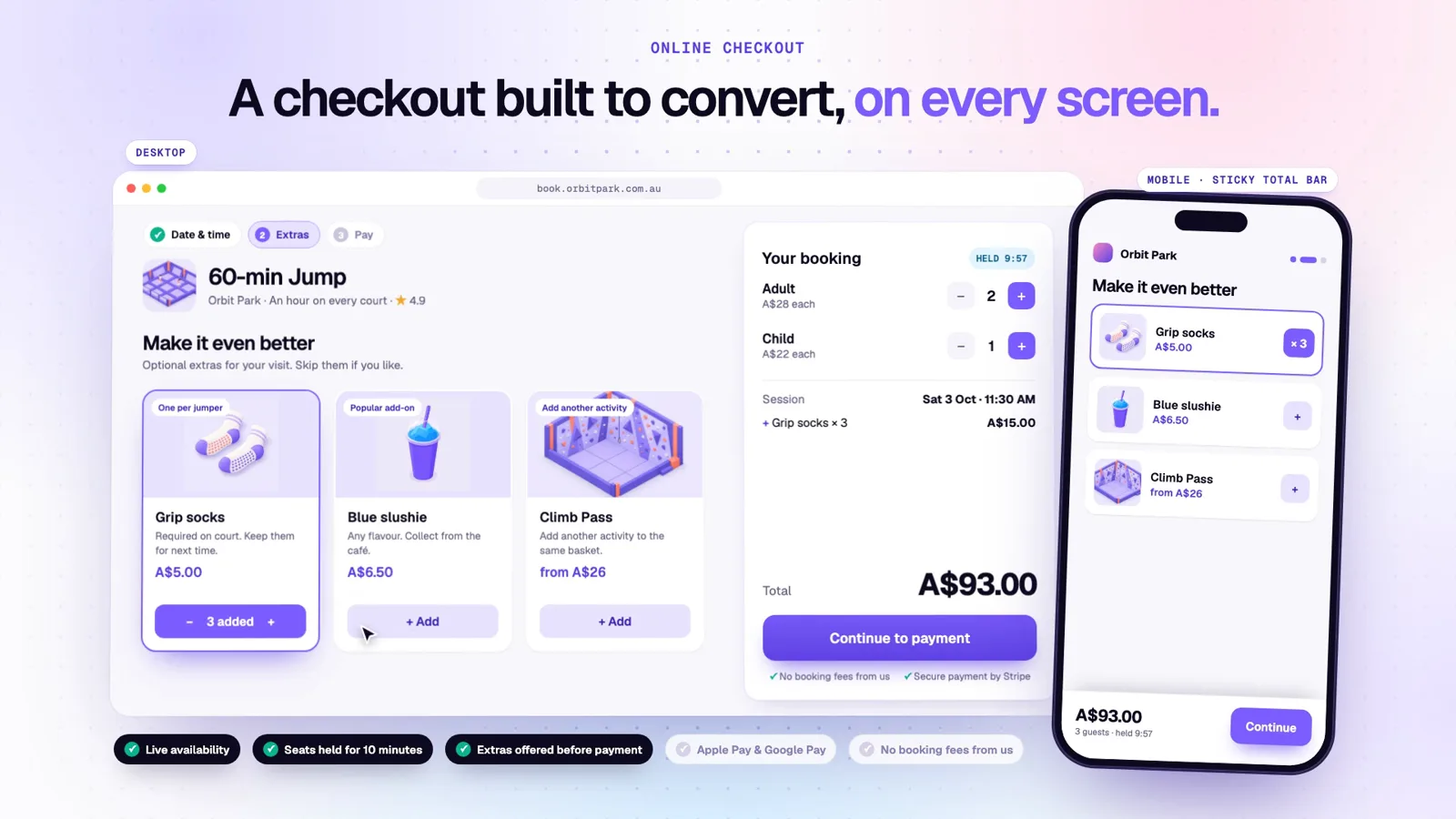
 Trampoline parksJump sessions with a hard cap, guardian waivers, grip socks and birthday parties on one screen.
 Laser tagBack-to-back games, team sizes that work, and party packages that bring the whole class.
 VR & arcadesTimed play on every station, prepaid passes, and a register for walk-ins and snacks.
 Climbing gymsDay passes, intro classes, memberships and waivers, with the guest record tying them together.
 Family entertainmentMany attractions, one cart, one guest record, and a kitchen that knows what to cook.
One booking, all the way through
Bookings, waivers, the till, the kitchen and the reports are usually separate systems. Here they’re one. Watch the ticket pick up a stamp at every stop, and tap any screen to take it over.
01 · Booked
A parent books four jumpers from your site while you sleep. The booking widget lives on your domain, holds the spot while they pay, and takes Apple Pay and Google Pay.
02 · Signed
A text goes out the day before and again two hours out. One parent signs for the whole family on their phone, and the signature lands on the booking.
03 · Checked in
The desk scans the ticket and sees the whole party. If anyone hasn’t signed, check-in waits until they do — a rule, not a reminder.
04 · Till
Two friends turn up at the desk. The desk sells them into the same 11:00 session, from the same count the website uses, and adds snacks to the same sale.
05 · Kitchen · Pro
On Pro, counter and mobile orders reach configured kitchen and bar stations. Follow progress on screen, bump completed orders and print dockets for the pass.
06 · Reported
The jump, the walk-ins and the chips are one visit in one set of numbers. Nothing to match up, and the report is in your inbox at seven.
That’s one booking. Set up your own venue and send one through it.
The owner app
Today’s sales, how full the next session is and the refunds waiting on you, on your phone and installed like an app. Approve a refund from home and the desk sees it at once.
Also included
Core tools share the same guest record and reporting. Lite covers everyday venue operations; Pro adds kitchen workflows and developer tools.
Schedules
Set a standard week, then drop school holidays and peak weekends on top. Close a date and nothing sells on it.
Memberships
Recurring billing, staff-assisted plan changes and configurable early booking access. Members can manage their own membership from a secure link.
Gift cards
Sell them online and at the desk. Balances redeem at checkout and at the till.
Guests
Every visit, waiver, order and review in one place, with duplicates merged.
Emails
Choose layouts, edit content panels and preview guest emails on a phone. Control which messages are sent, with per-experience variants.
Core tools
Included in Lite and Pro, with one guest record across your venue.
Sell online or at the desk, then redeem the same balance.
ExploreMonthly or yearly billing with a secure member self-service link.
ExploreBring guests back with multi-visit passes and prepaid wallets.
ExploreRun targeted offers and see their effect in your reports.
ExploreKeep party packages, invitations and RSVPs together.
ExploreCheck in guests and see where every group belongs.
ExplorePrepare and send quotes for schools, companies and groups.
ExploreSet time-based prices and review pricing recommendations.
ExploreKeep private post-visit feedback with the guest record.
ExploreBring your customer list across without retyping it.
ExploreCompare the workspaces you can access in the owner app.
ExploreGive each team member the access their work needs.
ExploreIntegrations
Stripe for payments, and Mailchimp, Klaviyo and HubSpot for guest marketing. Xero daily journals, QuickBooks and Zapier are beta. Google Things to do feeds require partner onboarding and configuration; Tripadvisor and Viator remain on the roadmap.
For developers · Pro
REST with an OpenAPI spec, signed webhooks across bookings, orders, memberships and wallets, a TypeScript SDK, and Zapier triggers in beta.
Compare Lite and Pro inclusions, with plans from USD 250 a month. API keys and outbound webhooks are included in Pro.
Mobile ordering · Pro
Guests scan, customise and pay on their phone—or share a table tab and split the bill. The order, kitchen progress and sales records stay connected.
Pricing
Lite covers booking and counter sales. Pro adds mobile ordering, kitchen workflows and developer tools. Enterprise is quoted individually. No extra Reservory transaction fees; payment-provider processing is separate.
Plans from
60-day free trial, no card. Monthly or annual billing. See the full plan comparison.
Built for your busiest Saturday
Online and front-desk bookings share the same availability. Once the last place is reserved, other guests can choose another available session.
With the Reservory venue service set up on your network (available after setup), cash sales of tickets set aside for it and check-in of existing guests who have signed their waivers keep working and sync, in order, when you’re back online. Without it, the register needs a connection.
Payouts go straight to a Stripe account you own. Reservory takes no cut of your tickets.
If a guest double-taps pay or the connection hiccups, they’re charged once. Two staff can’t refund the same ticket twice.
Start the free trial, set up your first product and sell yourself a ticket. No card, no call.
Plans from USD 250/month · 60-day free trial · no card
Rather see it with someone? Request a walkthrough or email the founder.
Plans from USD 250/month60 days free · no card
Start free